 Asarayja NUI Tools
What it is
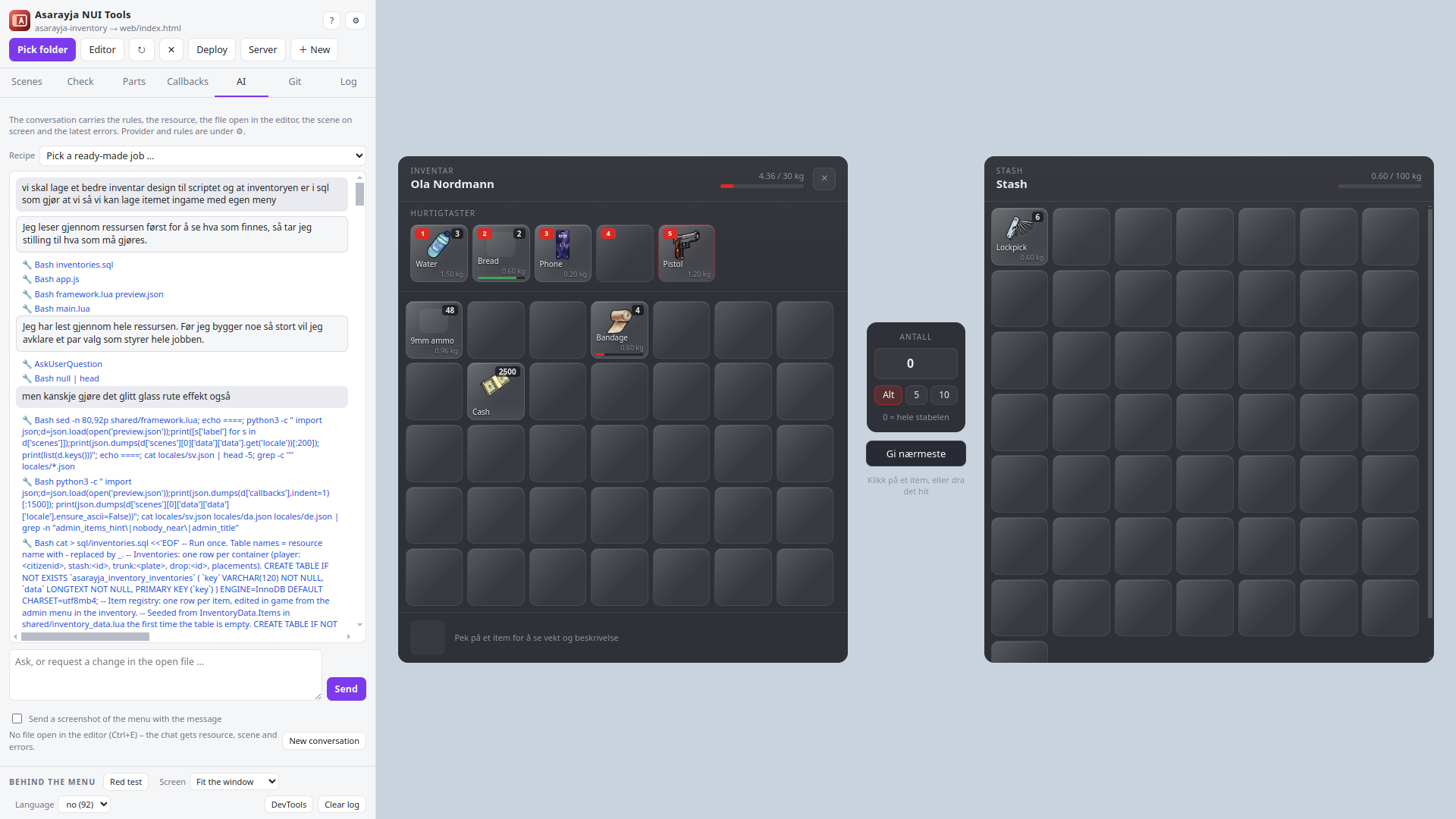
A RedM NUI is a web page drawn over the game. Normally you only see it in game: start the server, join, open the menu, find the bug, edit, restart the resource, repeat. Asarayja NUI Tools shows that page on your desktop instead. It reads the resource's Lua, finds every SendNUIMessage, guesses the data the game would send, answers the page's callbacks, and lets you edit HTML, CSS and JS while the menu is on screen.
A FiveM NUI is a web page drawn over the game. Normally you only see it in game: start the server, join, open the menu, find the bug, edit, restart the resource, repeat. Asarayja NUI Tools shows that page on your desktop instead. It reads the resource's Lua, finds every SendNUIMessage, guesses the data the game would send, answers the page's callbacks, and lets you edit HTML, CSS and JS while the menu is on screen.
Around that sits everything that came up while building a server's scripts: templates for new scripts and phone apps, a rule check for the mistakes that only show on the game's transparent surface, an AI tab that works under those rules, Git, and deploy or a file explorer against the server over SFTP or FTP.
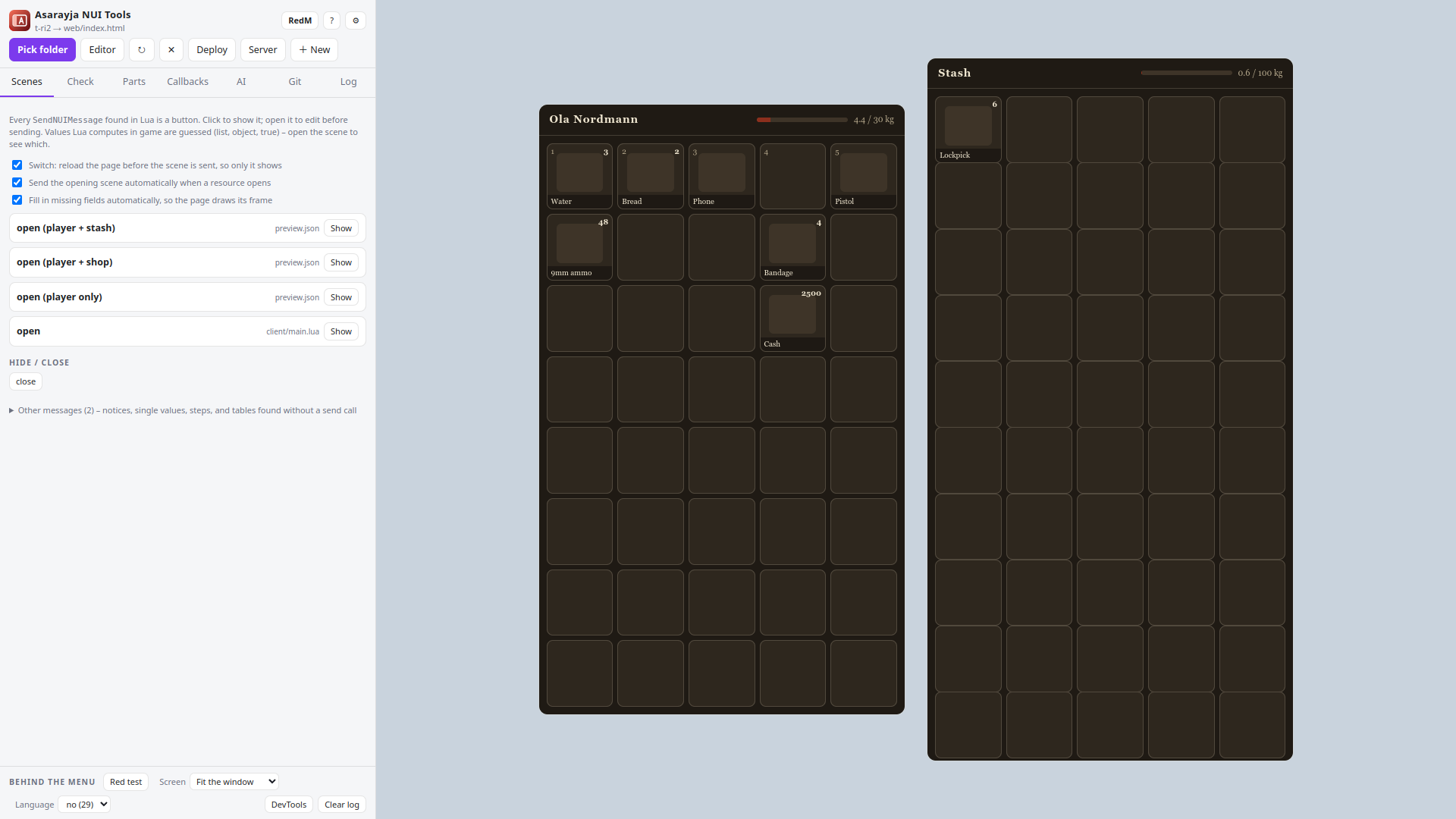
RedM works the same way: the page is the same CEF surface, so everything here applies. What differs is the Lua around it, and that has its own section below.
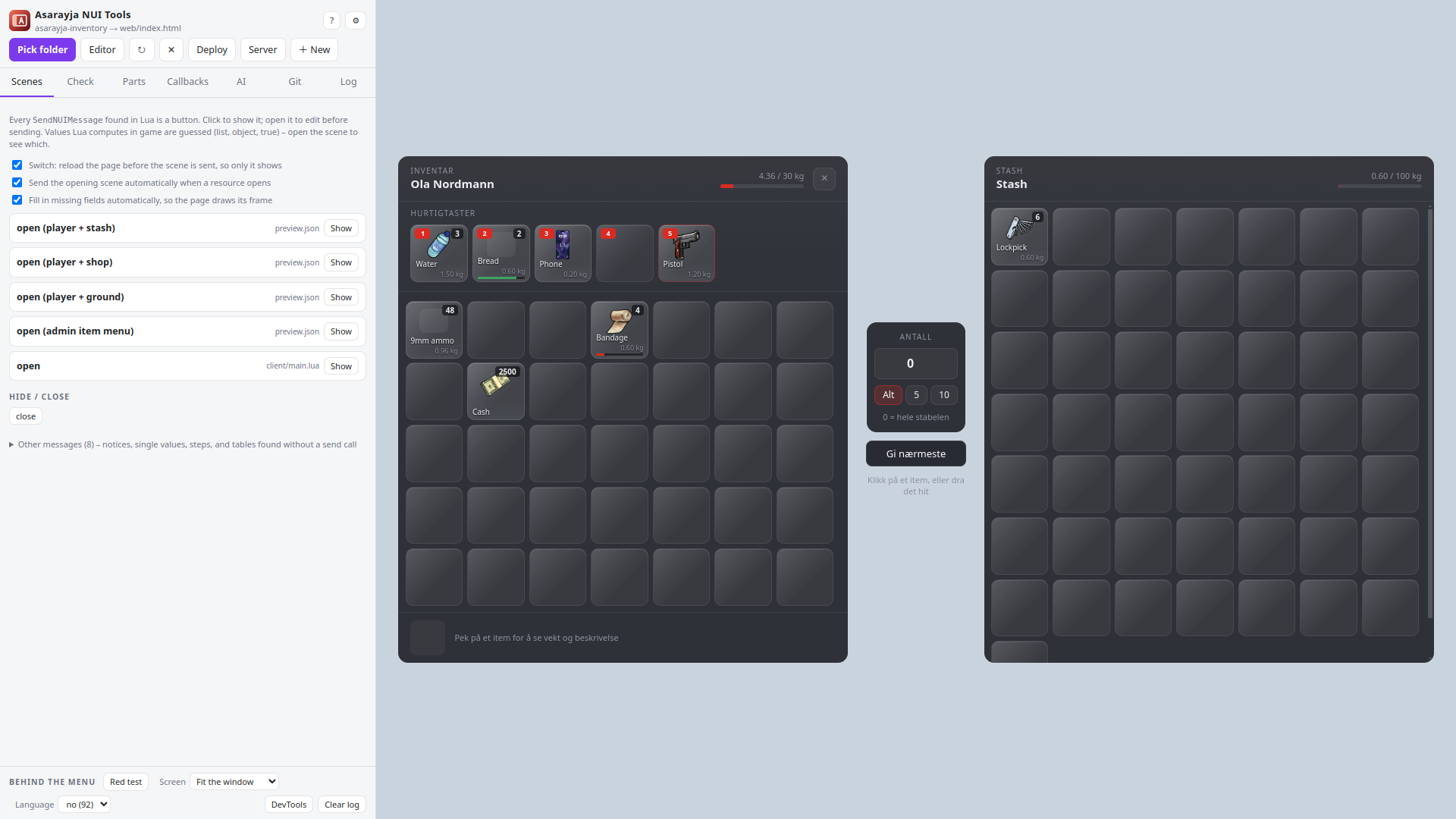
Every message Lua can send is a button. Click it and the menu shows that state, filled with data guessed from the script's own config tables.
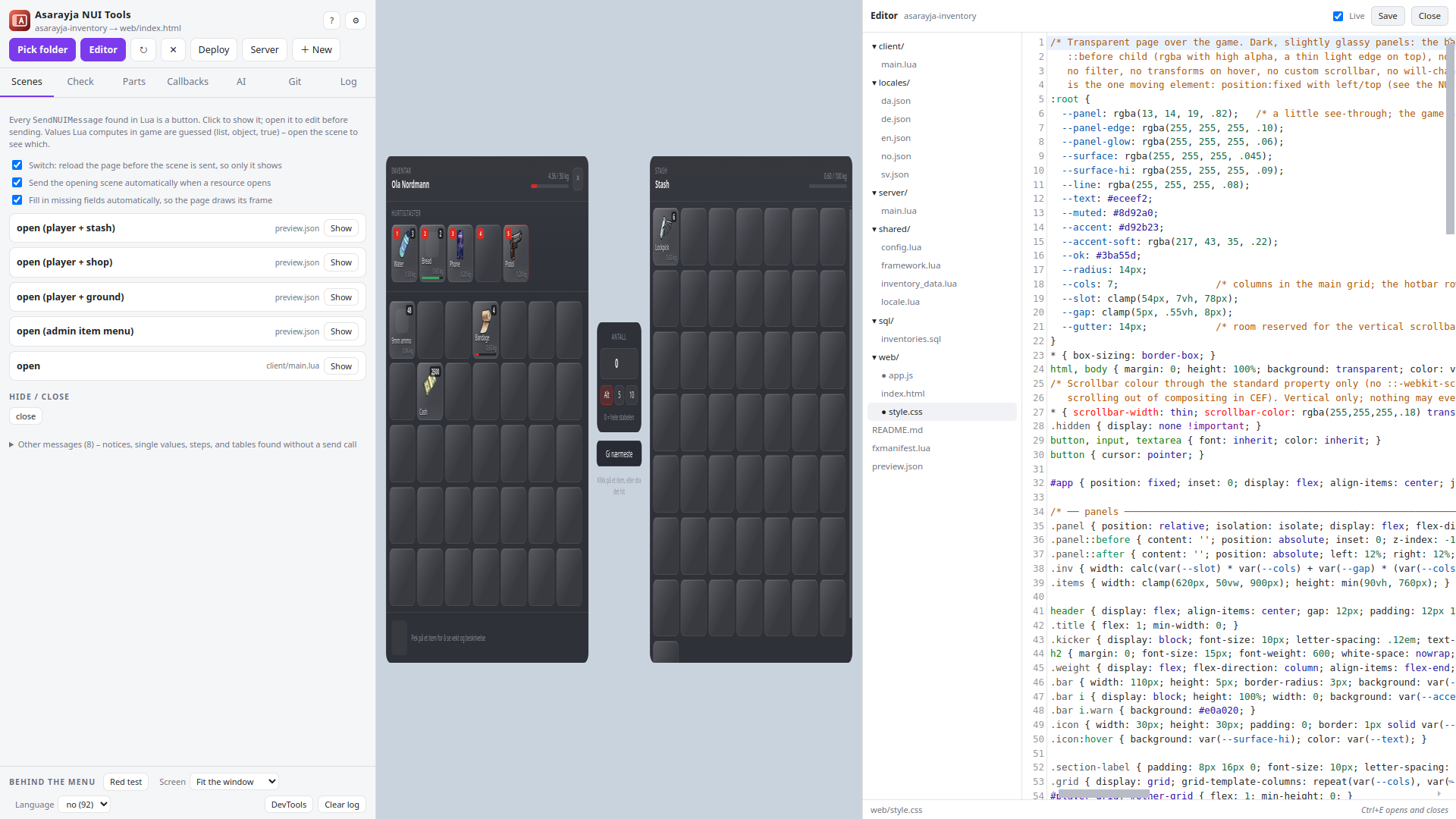
CSS applies while you type, HTML and JS on pause. The files as a folder tree, the ones the page really loads marked with a dot.
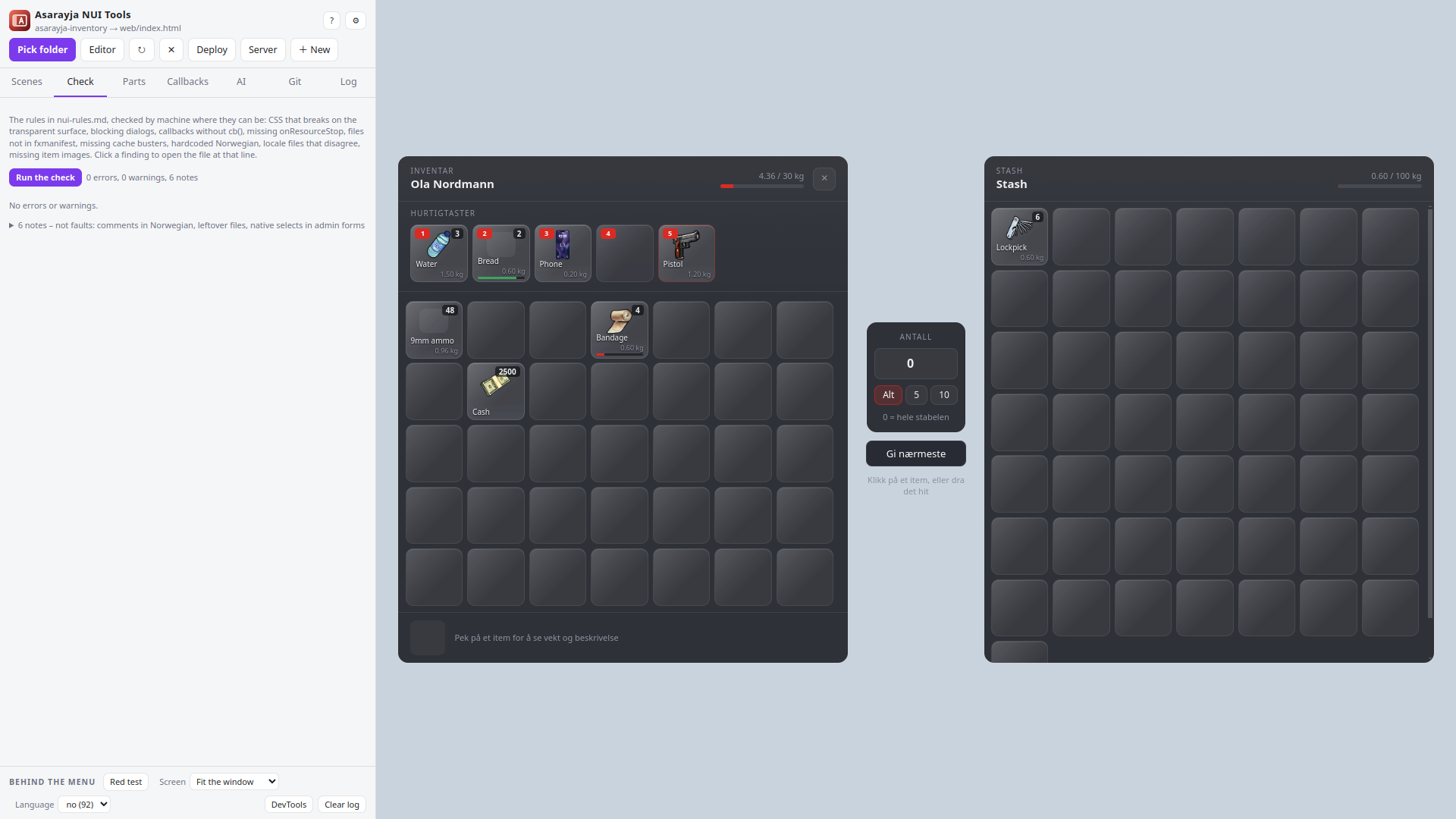
The NUI rules checked by machine: CSS that breaks in game, blocking dialogs, callbacks without cb(), files missing from the manifest, locale files that disagree. It reads the page and the Lua against each other, which is something only a tool with both halves open can do: a callback the Lua registers that the page never names is dead, because a NUI callback can only be reached by this resource’s own page. It finds a target registered inside an event handler – registered again every time that event fires, until the player sees the same option three times – and it now looks at loading screens, NPWD and oph3z apps, and where a player’s own settings are kept. And after the AI has worked, the list says what moved: what went away, what is still there, and – the half nobody would go looking for – what the change broke.
Claude Code, Codex, Gemini or a local model, always with the rules as its standing instruction. Screenshots of the menu go with the message; every change can be undone per file.
New script from a template: NUI menu, tabbed app (MDT), HUD, DUI on a surface in the world, inventory, clothing menu, loading screen, LB Phone, NPWD and oph3z phone apps. Locales in eleven languages from the start (no, en, sv, da, de, fr, nl, es, pl, uk, ro).
New script from a template: NUI menu, tabbed app (MDT), HUD, Node-built NUI, without NUI and loading screen, in a western look with a VORP and RSG bridge. Locales in eleven languages from the start (no, en, sv, da, de, fr, nl, es, pl, uk, ro).
Deploy with one key, or browse the server like FileZilla: fetch a resource, edit it here, send it back. Production servers are marked red and ask first. A folder fetched from a server remembers where it came from: Send the changes back lists what would change – which file, which lines – before a byte is written, keeps the old file as .bak, reads the new one back to prove it arrived, and can restart the resource over RCON in the same step. Nothing on the server is ever deleted.
The script's own tables, read from its .sql files and from the Lua that makes them at startup, with the rows it ships. Edit a row and every page that reads that table is drawn with it. Kept beside the script; the .sql files are only read.
What the player sees after the click: notifications, progress bars, dialogs and context menus drawn with ox_lib's own page, the eye with ox_target's, and the script's keys pressed with the tool's own. Picking an option plays what the Lua behind it does.
A folder of vehicles is a resource too. Its cars are listed with what their handling files say and what is wrong with them, and Take it for a drive puts one on a course – straights, a fast bend, a hairpin, cones to steer round and a wall at the end – with every field of handling.meta beside it: change a number and the car is driving on it before you have let go of the key. A car that is only a model is given the files it is missing: a handling entry of its own, a vehicles.meta so it spawns at all, colours, and a siren setting for the lights on a police car – with the data_file lines in the manifest and the framework's own spawn line to copy. Every number has a bar to drag as well as a box – the range is the one the check knows, and the line under it says what the field does and what the file had. It tells a car from a part, too: a tuning pack is two cars and two hundred bumpers, spoilers and wheels, and a part has no handling of its own – a mod kit in carcols.meta names it and fits it at a bone. The drive is a circuit with lap times, the lap before drives beside you as a ghost, and a switch puts the model's own workings on screen - which end is out of grip, how much lock the speed allows, what is holding the car back - each line naming the field that is the knob for it. Every drive writes its own log - which car, what was changed while it drove, what it did and what it measured out at - in a folder of its own that you can empty from the window. And a car that lives on a server can be fetched over SFTP or FTP – the meta files on their own – tuned here and sent back, with every field listed before anything is written, the old file kept as .bak and the new one read back to prove it arrived. The car is drawn as the car: the .yft's own shader group says which piece is paint, glass, tyre, light or badge, the textures come out of the .ytd beside it, and the body takes the colour you pick. The course is a road rather than a diagram now: asphalt with grain in it, red and white kerbs all the way round, a barrier on the outside of every bend, lamp posts and trees, and hills on the horizon – with a switch that puts the plain one back. The crash test is the other half of what the file decides and the half nobody can try in game without wrecking something: into a concrete wall, an armco barrier or a tree at a speed you pick – at the speed it can actually reach – and then the bill, with the field that decided each line beside it. The trees are solid, so leaving the road costs something there too. Nothing in a handling file says “drift car”, so the tool reads the choices every one of them makes - rear drive, a grip curve that falls away, little grip sideways, and enough steering lock to catch it - and says which fields decided it; there is a drift track beside the circuit to try that on, where the angle held at speed is what scores. And the AI is given the car: the entry as it stands, what every field in it may hold, and what the model measures - ask for a change and the window picks it up while the car is still on the road, with the number and the slider up to date. Ctrl+K puts the same conversation over the whole window, on top of anything, the drive window included. Beside the circuit there is a hill road - fifty-three metres of climb, seventeen per cent at its steepest - where the climb is what shows up the drive train: going up, the car leans back, the weight comes off the front wheels, and front wheel drive runs out of grip on a hill it would walk up on the flat. The slope switch goes to seventy per cent either way - about a third of a right angle, steeper than any road is built - and beside the other numbers there is the steepest hill the car will still climb from a standstill, which is the drive train and the grip rather than the power: rear drive 73 per cent where the same car front drive manages 37. Rain and snow go over any of the three courses, one at a time, from the driving seat (F7 and F8): a wet road with the water standing in the same corners every lap, or a snowy one where stopping from 100 takes 73 metres instead of 39 and the steepest hill it will climb falls from 73 per cent to 15. Four flags in strHandlingFlags are the whole of what a handling file has to say about weather, and they are read - rally tyres take that snow stop back to 57 metres. What a handling file actually says about weather is one field and four flags, and the tool reads them the way the game does rather than the way they sound: fTractionLossMult scales the difference between one surface and another, so it does nothing at all on a dry road; HF_HAS_RALLY_TYRES inverts the traction curve, which makes a car better on the loose and worse on tarmac; and the two off-road bits are more gravity rather than more grip. Liveries are read as the three different things they are – textures in the car’s own .ytd, parts in the mod kit, and the roof livery – and the two that can be worn go on the car, with a slot that is turned on and has nothing behind it named as the fault it is. The colours it ships in are swatches beside the paint, out of the game’s own 161, and a switch drives it with max mods fitted – what its own statMods sell – which is how anybody on a server will actually be driving it. The sweep is stricter than it was: a meta file declared under the wrong data_file kind is named and still never read, a car the meta files name with no model in the folder never spawns, and a mod kit id, siren setting or model name two packs both claim is the fault neither of them contains – the game keeps one and the load order decides which. Extras are read as well: the extra_ bones in the model against the flags in vehicles.meta that say what to do with them. A wheel is found by the bone it hangs on rather than the shader it wears – a mesh wearing a tyre shader is as likely to be four brake discs in one object, and taking that for the wheel put sixteen of them in orbit round the car. Most packs carry no wheel at all, because GTA’s belong to the game and are picked by the wheelType, so those get one of ours: as big as the hole in the bodywork lets it be, and said out loud to be ours rather than the pack’s. Where a car does carry its wheels they stay where they are, and only the bones the file left out borrow a copy, mirrored on the far side the way the game does it. Which of the car’s colours a panel is painted in comes off the material rather than the shader’s name – vehicle_paint2 is not “the secondary one”, and a vehicle_mesh can be painted while a vehicle_paint7 beside it is not – so the secondary, pearlescent and wheel colours go where the car says they go; one layer means white whatever the car is sprayed, which is why half a garbage truck stays white here and in the game both. The best shape is in the _hi.yft beside the file and that is the one drawn, never both, because a fragment holds four levels of detail and the game wants five. The view sits about a car’s length behind rather than two and the lens widens as the speed comes up, which is most of what makes speed look like speed. And two things the game does that the model did not are read: downforce, which in GTA is a number added straight onto grip and grows with speed rather than any aerodynamics, and the low-speed traction loss that lets a car light its tyres off the line.
An addon clothing pack is the one thing here with no code in it at all: four files that have to agree with each other, and every fault is two of them disagreeing. A folder of clothes opens as clothes, and so does an empty one – the tab is the way in to making a pack, not only to looking at one. The check holds the four against each other, and it does it the way the game does: a drawable's file name and its textures' are not written down anywhere, the game works them out of the collection's own data, so this works out the same names and says one sentence – what a file is called against what the .ymt says it is called. The game believes the .ymt, so a mismatch is a file it looks for under a name nothing on disk has. It also says the one line nobody writes: the client only turns the caret in a streamed name back into a slash on a server holding the subdir_file_mapping policy, so without dependencies { '/policy:subdir_file_mapping' } a pack that is right in every other way starts, streams every file and shows nothing at all, with nothing in the console. The workbench is a window of its own: the project on the left, the freemode body that ships with the program in the middle – in its own skin, wearing the garment with its own texture – and on the right everything that one garment is told about itself. Which slot, which body, skin tone, the first-person model, the sound it makes walking (the game's own profiles, filtered per slot, so shoes get the eighteen shoe ones and a top gets the clothing ones), the mask model drawn round the edge of the screen in first person, the tint a pair of glasses puts on it, and the twelve behaviour flags with the bits the game actually reads. On a shoe there is a heel height with Measure it: the right one is how far the shoe reaches below the floor the bare body stands on, and both are numbers the window already has, so it is read off the model rather than nudged. On a head prop there is what happens to the hair under it. Drag to turn the ped, the wheel to come closer, the arrow keys through the list. Then loose garments become a finished resource – the caret names the client reads back, the .ymt, the shop .meta, the manifest with the policy line, and where they are needed the two files nothing else writes: the creature metadata, without which a heel or a hair setting is a number nobody reads, and the first_person.meta where the mask model and the tint actually live. It is checked again afterwards, and it says what it costs against the ceilings nothing in the files warns about: the 255 drawables a collection holds of one kind, the handful of .ymt slots a ped has left on your game build, and the 65,520 shop entries every pack on the server shares. A pack you built opens again with everything it was told still on it, and a project file keeps the list in the order it was made – which is not a convenience: the order decides every garment's number, a collection is renumbered from 000 on every build, and losing it means every saved outfit on the server points at the wrong clothes. Projects from other tools open too, where their format is open. And a texture can be looked at, saved out as a PNG or a DDS, or replaced from one: the new picture is fitted to the slot's own size and format and written over the old payload byte for byte, so nothing about the file moves, with the old one kept as .bak. A file straight from a download is read the same way: the ped in front of a caret (mp_f_freemode_01^accs_001_u.ydd) says which body it is for, one of the game's own prefixes anywhere in the name gives the slot – as a whole word, so forehead is never head – and a name that says nothing is still a model, asked about rather than guessed at. The cloth physics beside a skirt travels with it, under the name the build gives the garment, because that shared name is the whole of how the game finds it. What it costs is a second pass that opens the files rather than their names: triangles against the budget, how many of the four levels of detail a model actually ships, how much of its picture the mesh reaches, and per texture the size, the format and the levels behind it – with a duplicate found by hashing the picture itself, because six colours of one top are six pictures of the same size and none of them is the same picture. What it finds, it can do, in the file itself: a picture made the size the hardware wants with the levels it was missing; texture coordinates moved onto the part of the picture the mesh uses, with every picture cropped to match; triangles taken out by quadric error, where a vertex is never moved and never blended – so the bone weights that make a sleeve follow an arm are the ones that were there – and a seam is never crossed; and the levels of detail a model never had, made out of the one it has. Everything goes back into the room the file already had, with the counts written where they were read from, the old file kept as .bak and the result read down again and compared. Making a level of detail is the exception: the only change here that makes a file bigger, and the only one the program says out loud it cannot prove without the game. And a build is two choices before it is anything about clothes – a collection of its own or a replacement, which wears the name of what it stands in for and writes nothing else; and the format the game has always shipped or the Enhanced one, told apart by a number in the header, because the wrong one does not look wrong in game: it crashes. And the ped is no longer a shape. The bodies carry the four bones that pull on every vertex and the skeleton they hang off – 128 of them, out of the game's own rig – and a garment carries the same thing in its .ydd, so it is skinned to the body rather than laid over it. Standing, Walking, Running: a skirt that is fine on a statue goes through a knee the moment the leg moves, and that is a thing to see before a server does. The walk is written here rather than read – there is no clip to read – and says so. The bones the freemode peds spring are the game's own, SPR_ on the chest and SM_ under a skirt, and there is a switch for them: a garment weighted to them moves with the body, one that is not stays exactly where it is, and the look-over says which of the two it is. Only the behaviour flags the game reads on that kind of garment are offered – five on trousers, ten on a head prop – because half of them are about a helmet, and one already set where nothing reads it is shown, marked, and written out as it stands. A prop is not a garment at all: the game parents it rigidly to one bone and reads no weights, so it hangs off that bone here too, and a model that is still skinned, or still standing in the ped's own space, is said to be a garment somebody has labelled a prop. And a garment can be modelled here, in the file itself, without Blender: Shape is a tab of single strokes, each written into the .ydd and read back – weights copied from the body the robust way, the closest point taken only when it is close and facing the same way and the rest filled in from the neighbours; seams smoothed one ring out and the spring bones never touched; pushed out of the body, inflated or deflated along the normals, mirrored left to right with the bones renamed, stood on the body, the hem lifted above the floor. Four more come from the cloth creator and do here what it does in Blender: hair weighted head, spine and spring by the profile measured out of twenty-eight working hair files; the body's jiggle grafted onto a garment that has none, the skin's own amount at the closest point; a garment narrower than the body widened in twelve rows and nowhere else, the arms left out of the measuring; and the lower levels of detail weighted from the first – a level written without room for weights is given the first one's layout, which is the second change here that makes a file bigger. Where a walk puts the body through the cloth is painted red on the garment, vertex by vertex, and Push the red out moves those and their ring and nothing else. Every stroke keeps what was there: Ctrl+Z takes it back and Ctrl+Y puts it back, twenty steps a garment, on that tab and nowhere else, and the .bak on disk stays the file as it was before the first one. Every stroke reaches every level of detail, moves the records of a seam together, and leaves to the cloth simulation the vertices that belong to it; a garment with cloth physics is refused by anything that would take vertices out or reorder them, and the file is written whole or not at all. Push out holds the cloth's own shape while it pushes - the two-term energy every draping method uses, pulled to the target and held to its own differential coordinates, in rounds, capped against where it started. A garment is carried to the other freemode body: by the bones from the one rig's rest pose into the other's, then put the same distance off the other skin along that skin's normal, the folds held, every level given weights first when it has none, and weighted from the body it now stands on - which is how the second version of a garment is made. And there is a brush: grab, inflate and smooth on the garment in the window, a falloff with no crease at the rim, the seams moving as one, the stroke mirrored across the middle, each stroke one step for Ctrl+Z and carried to the levels below. Modelling and Movement are tabs in the garment panel, beside the ped. The brush is a bar of six - Grab, Inflate, Smooth, Relax, Flatten, Pinch - with a ring drawn on the surface where it will land, its reach measured along the surface rather than through the air, smoothing the HC way that evens without shrinking, and Blender's rule for an open edge, so a hem survives. A freeze brush paints what the other brushes must not touch. And the views a garment is judged in inside Blender are in the window: the weight of one bone as a heat map, front faces blue and back faces red, the two vertex colours as the file has them, and how far the picture is stretched on the cloth. A garment can keep its number: the build fills the numbers below it with dummies - a drawable that draws nothing - so outfits saved on the server keep pointing at the right garment, and past 255 of a kind the collection is split into a second one. The look-over's oily-in-the-sun finding has its fix on the Modelling tab: Colour 2 written black. Build it opens a dialog first: where the pack goes and what it will be called, what will be written, and - when the folder that is open already is a built pack - the choice to save back into it, with its old files taken away and every number kept. Right-click a garment for two more: export it, the .ydd with every .ytd it wears, into a folder of your choosing; or take it out of the pack, which leaves a dummy at its number so nothing saved on the server moves. A pack made of several collections – EUP is thirty – builds as one resource per collection the files came out of, a prop archive with its own collection, and what replaces the game's own clothes left to a replace build, where its textures now travel with it. And a pack declared with __resource.lua is read as it is and built as fxmanifest.lua. And the game's own walk can be watched instead of the one written here: Load a clip takes a clip dictionary as CodeWalker exports it from your own installation (.ycd.xml; nothing of Rockstar's ships with the program), lists every clip in it, and plays the one you pick as the game plays it – every bone by its tag, lerped between frames, on the spot – with Walk it measuring on the same clip. A defective garment nobody can repair is swapped out and keeps its place: right-click it for Swap the model for another .ydd, or a texture for Swap it for another .ytd, and the new file goes in under the old name – which is what carries the slot and the number – read first, refused if it is the other build's format, the old one kept as .bak. And a texture can always be added, to a garment with none as much as to one with three. The garment panel is four tabs – Textures, Garment, Modelling, Movement – and the textures come first: a row is a letter, the file, its skin tone and the tint, double-click wears it, and the button at the end of the row is where it is looked at, replaced, swapped or saved. Props hang where the cloth creator measured them against the game's own files: a watch off the forearm roll bone, not the hand, and a prop on a hand slot is called dead outright, because those two slots register nothing in game. A pack out of several collections is listed as those collections, one shelf per slot in number order, with the number the build will write beside every garment; and Make it a prop on the Modelling tab does what the cloth creator's button does – the vertices written in the anchor bone's own space, the model marked unskinned, the slot picked beside it, and a piece weighted to some other bone than the slot's anchor said out loud. The game build a pack is counted against defaults to 3570, the one most servers run – 3889 is in the list but marked as not yet in FiveM – and a pack built here writes its build into its manifest and shows it again when opened. A hair is grey in its file and coloured by the game from a palette of 64: the Textures tab of a hair has a colour and a highlight, picked outright or by the game's own id once the palette is loaded – the palette lives in the game, so a two-file resource that ships with the tool dumps it with one command – and the look-over says when a hair is drawn with a shader the game cannot colour. Modelling is a mode, as in Blender: Tab or the button at the top of the strip turns it on with a brush in hand, Tab or Esc puts everything back to normal, and outside it the brushes are dead. A click on the garment in the view selects it and outlines it in the theme's colour; the mirror is off until asked for. Eight more fixes came out of measuring this against what people actually do: merge by distance (the step every tutorial runs first), closing the openings a ped shader turns into holes, the .ymt slots a ped has left on your game build, the cloth physics read out of the .yld and held against the binding in the model, a hair's empty alternate for under a hood, writing a model or a texture dictionary out again when the game refuses it, and normal and specular maps made out of the diffuse. The wheel goes to twelve centimetres, and Walk about takes the camera off its orbit – W A S D where it is looking, Q and E up and down, the right button to look round, the ped standing still – so a garment that sits inside the body can be pushed out from wherever you can see it. The clothing folders you have had open are on the tab itself, so one pack can be swapped for the next without going back out to the start. A garment stands in for the body part it replaces rather than lying over it, the way it does in game: put trousers on and the legs under them are gone, put shoes on and the feet are – so a pair can be judged rather than seen over another pair. Looking through the body or at what is inside it keeps the part, since that is the thing being looked at. Standing, walking and running are thirty-one now: the ped sits, kneels, lies down, climbs, swims, aims, folds its arms and turns its head through the whole of the neck – because a collar is only wrong when the head turns, and a skirt only when the ped sits down. All of them are written the same way, and a clip out of the game still plays beside them. Jiggle is weights and not an effect: the body that comes with the program carries the two spring bones for real now, so the switch moves what the game would move, the workbench can make those weights on the shape in front of it the way the cloth creator does, take them off the body onto a garment, and say which garment is not weighted to them at all. A round of work went into the tools themselves, from asking what people who make FiveM clothing actually use Blender for. Lay it on the body is the shrinkwrap that turns a flat piece into one that hugs a body – not the same as pushing out of the body, which only lifts what is inside. Move, turn and size do what G, R and S do in Blender, each axis on its own, and one side can be dragged on its own as well. The texture coordinates of another garment can be carried onto this one, which is how nearly every garment in this game gets its UVs and the one job people kept Blender open for; where the two are the same mesh it is exact, and where they are not it says how many vertices were out of reach. A sleeve made on its own has its opening pulled onto the armhole it belongs to. The weights can be made legal with the thresholds on show rather than silently on the way out, and the seam weights can be synced without welding anything. A garment with a .yld can be bound to its cloth again after being reshaped – the repair for “failed to bind” – and the jiggle can be given room by running it twice, with the springs swinging and with them still, and pushing out only what the swing adds. A folder of colours becomes one texture dictionary each, the shader can be guessed from what the texture does with its alpha and what the garment covers, and all twenty-seven of the game's ped shaders are known rather than nine.
The tab is called Studio now, because it stopped being only clothes, and it says what it is when you hold the mouse over it. New in it: Give it cloth physics, for a dress, a coat or a cape that has none – a coarse proxy out of the part that should move, the .yld written beside it, and the garment bound to it, with every vertex the proxy cannot reach left on its bones and counted. Whether it hangs right is a thing to see in game, and the tool says so.
A tattoo is not a model, and a tattoo pack is not a resource format at all: it is one plain XML file listing rectangles, a texture dictionary beside it, and two lines in the manifest. Which is why every fault is in the file. The overlay file is mounted by name, and the name the game hashes is the file name without its extension; both hashes a preset carries – the dictionary and the texture – are hashed the same way, lower-cased first, so one capital letter in a texture name is a tattoo that is present in every file and shows on nobody. The .ytd belongs under stream/ and must not be listed in files{} as well. Where a tattoo lands is six squares, not one body: torso, head, each arm and each leg are each their own 0–1 picture, so a number outside its own square is a tattoo somewhere else entirely. The workbench draws it where the game draws it – the preset's position and scale against the body's own UVs, with the sideways stretch that each zone and each sex carries; an arm's is four times a torso's, and a woman's torso is not a man's. So a sleeve placed on one body is not in the same place on the other, and that is the thing the program does that the file cannot: one tattoo, placed on the male body and the female body at once, with a lock on what has to be identical and freedom where it must not be – a chest piece that has to sit exactly the same, an arm that has to move a few millimetres on the smaller frame. Mirrored limbs turn the rotation with them, which is easy to get backwards and was got right by measuring. Then the pack is written: the collection XML with the presets in the order they were made, the textures, the manifest with the overlay line – and read back and checked afterwards. It says what it costs as well: a ped wears fifty-six decorations in all, renaming a pack renumbers every tattoo in it unless the server has game_enableStableOverlaySort set, and 512×512 DXT5 is what the game expects. A finished pack opens again as it stands, other people's included, and the project file keeps the list in the order it was made – which is the order the numbers come from. A tattoo can start as a drawing: a .png is taken as readily as a .ytd, shown on the ped straight away, and packed into the texture the game reads when the pack is built – 512 square, DXT5, every mip level, and the drawing on disk never touched. One that is not square is brought to it and what it was is said. It happens in the clothes workbench: a switch in the strip over the stage says which of the two sets of tools the window is in, the tattoos are a shelf in the same list as the garments, and one still being placed sits above them until it has a name and a place on the body.
What comes down from a Sims 4 site is a .blend, and until now the only way to look inside one was to own Blender. The program reads it itself - the file describes its own layout, so nothing is hardcoded per version - and writes the mesh you pick as a .ydd in the ped's own space: a garment out of a scene stands where the floor is nought, so it comes down to the ped's floor, and a file with a body in it is measured against that instead. What it covers is what it is, so it lands in the right slot by itself. From there it is an ordinary garment, and the tab called Step by step is the order to work it through: the normals, the weld, the placement against a garment that already fits, the sleeves - everything from outside is modelled arms-out and a ped stands arms-down, which is a rotation and not a size - the inside for a single layer of cloth, the body's weights and its jiggle, the seams, the triangle count and the check. The shader sits on the Garment tab beside it, because the commonest reason a converted garment looks wrong in game is that one: on plain ped the alpha channel is ignored and lace comes out solid. A .png can be the texture, packed into the dictionary the game reads, and the shader is told to ask for it. What is being done here is picked at the top of the window, beside the game build: making new clothes, adding clothes and fixing them, bringing one in from outside, or tattoos. The job decides which tabs are on the right, which tools are in them and whether the ped is on the stage at all – nothing is thrown away by changing it, and every tool is one chip away under Every tool. Making new clothes is Blender's own Add menu in this game's sizes: plane, cube, grid, circle, UV sphere, ico sphere, cylinder, cone and torus, on Shift+A under the mouse as in Blender - all of Blender's own Add > Mesh but the monkey, which is a test mesh of Blender's own and no use on a ped, with the segment counts that read as round at the distance a ped is seen from and texture coordinates on all eight. What comes out of it is not a garment yet and does not pretend to be one: it has no body, no slot and no number, it stays out of the build until it has them, and its tab says what it is, how big it is in millimetres and the numbers that made it. Moving, turning and sizing are three tools across the top of the view, as they are three in Blender, and you drag the garment with them – G, R and S pick them up, the numbers are in the corner of the view for when a number is what you want, and pulling one side is the fourth – and when it looks right, one button makes it a FiveM garment and puts it on the shelf it belongs on.
Necklaces, rings, earrings and face piercings are made in Studio from Add → Jewellery, on the body on the stage: the neck a chain lies on, the finger a ring goes round, and the lobe, nostril, lip and brow a piercing goes through are measured on that body – the female and the male one each on its own. A necklace rests on the back of the neck and hangs down in front, or sits close round the neck as a choker: cable, curb, cuban or ball chain, with a medallion, a cross, a bar, a single stone or nothing, in the length and link width you type. A ring is a component held by its own finger's bone, on any of the ten fingers (the hand prop slots do nothing in game); earrings and piercings are the ears prop. Every piece comes out textured in four metals – gold, silver, rose gold and black as the letters a to d – with the stone on its own strip of the same texture, the way the game's own chain and pendant share one picture between two parts, and it is already weighted. What a character's head blend changes, you move by hand with G, R and S. Bracelets go round the wrist of the body on the stage, where real ones sit: a chain, a round bangle, a flat cuff, a tennis bracelet of stones or beads, snug or loose, as a prop on that wrist - and a bracelet built as a neck piece or a bag, as some sold ones are, goes onto the wrist with Make it a prop. Any piece, or only its stones or only its metal, can glow in the dark: that part is drawn with ped_emissive, the shader a chain that glows in game uses, at the strength you set (WhiteWidowChain's glowing parts are 4.2), and the rest stays plain - two parts of one drawable. Any other garment can be given it under Drawn with, Glows in the dark. Earrings come as studs - a stone, a ball or a flat plate, with the post through the ear and the back behind it - and as the ones that hang: huggies round the edge of the lobe, hoops, drops and a dangle with a cross; in the lobe, a second hole above it or up in the helix. A stone, or a row of them, can also be made on its own and set on anything - not every piece wants one, and any piece can have one. Every stone can be cut round or as a heart.
A made piece is a starting point, not the end of it. Chain, built by hand is a row of links you work on one step at a time: links added or taken off at either end, either half bent or twisted about the middle link, laid on the skin, let hang under its own weight with the body holding it up, and the two ends joined when it is long enough – the spacing of the links is kept at every step, so a chain never stretches. A necklace made from the menu can be taken over as such a chain with Build it further by hand. Make a copy is Blender's Shift+D and Join another piece to this one is Blender's Join: a pendant and its chain, a ring and its stone, a patch and its shoe become one drawable with each part keeping its own material, which is how the game's own files are built. Moving, turning and sizing a piece of jewellery is remembered on it, so changing a number afterwards does not throw the placing away. A model sold as one piece is many: Pick pieces picks them by clicking - a pendant, a link, a stone - Pick all like these finds every link of a chain from one, Take them out (P) lifts them out into a garment of their own, and Join another piece to this one hangs them on another; so the dollar of one chain and the links of another become one necklace. Their place in the picture moves the picked pieces' texture coordinates into the part of the picture you choose, with the texture shown underneath - which is how a part gets a colour of its own, the way First dollar chain's dollar lies on the gold and its chain on the silver.
Add → From a picture… turns a PNG into a solid piece: what is not see-through (or, in a picture with no see-through, what is not the colour of its corners) is given the thickness you ask for, with the picture itself on its front. A skull patch for a shoe is five steps. Move the skull against the side of the shoe with G, R and S, facing it, and press Lay it on another garment: it bends round the shoe and keeps its own thickness. Make a copy and Mirror make the one for the other side, and Flip the picture turns its picture round so the skull does not face backwards. Join another piece to this one puts each one into the shoe, where it takes the shoe's own weights and bends with the foot. Then Pick pieces, click the skull, Find free room finds an empty part of the shoe's texture, and Put a picture there… paints the PNG there in every colour of the shoe and moves the skull's coordinates onto it. The textures keep a .bak.
Every real heeled shoe is modelled already in its heel pose - toes down, heel up, the ball of the foot and the heel tip on one plane 7-15 cm under the floor - and its heel value lifts the ped back up to it (27 measured; one stands 12.2 cm down with a value of 1.3). So a flat shoe becomes a heeled one in two steps. Put it in heel pose (Modelling tab) moves it into that pose with its own weights: the ankle stays, the foot turns toe down and the toes lie back along the floor, the ball about 9 cm down at 100 %, less for a lower heel. Then Add → Shoe parts → Heel fills the gap from the lifted heel seat to that plane: normal, block, stiletto, wedge, or a gothic platform with its own chunky heel and a ridged tread; Flat just thickens the sole. Join another piece to this one with the shoe and it gets the heel value that puts its feet on the floor. A Zip runs up the inside of the leg, the outside, the back or the front. None of this has been tried in game yet. The heel sits at the very back, flush with the back of the shoe as on real ones; pick its shape (thick block, thin and round, stiletto) and thickness. Spikes and Chain (Add → Shoe parts) go where you put them: press Place on the shoe and click on it - spikes follow the line you click, each standing out of the leather, and a chain hangs between the points you click, lying on the outside of the shoe; both are mirrored onto the other shoe unless you ask for one.
Open one pack in Studio and add the others with Add a folder of garments: the build makes them one new collection, in a new folder beside them – the packs they came from are not touched, and nothing of them is left in the new one. Name the collection in the build dialog itself; what stops a build is listed first, in red, with the file each fault is about. Two garments that want the same number keep one and move the other to the next free one, and the plan says which (building one resource per pack keeps every number). The hair swaps a pack carries in pedalternatevariations.meta go with their garments into the new pack. And what is done in Studio is kept only when the work has a collection name: closed without one, the files are put back as they were, and what was done is set aside in the app's data folder.
On a texture's own menu, A new colour of it… turns the hue and moves the saturation and lightness of the whole picture, or of one colour only – click the picture to pick it, so the red of a jacket turns and the badge on it stays – with black, white and grey left as they are if you like. What you see is what is written: a new texture beside the old one, added to the garment as its next letter, the old one untouched. And the build now says which hair has no weight on MH_Hair_Scale: a hat's hair setting cannot shrink such hair, so it shows through the hat.
Pick MLO (interiors) in the workbench's Mode menu and open an MLO's folder. The garment list gives way to the interior itself: limbo (the outside) first, then every room with the things placed in it, the portals as 'room → room' with what kind they are, the entity sets with an eye to show or hide them, and the files. The stage draws the rooms as coloured boxes, the portals with an arrow for their direction, and every thing from its own model – or as the box its archetype gives it when the model is not in the folder or is encrypted. Double-click a thing to pick it; Walk about lets you go inside. The side panel says in words what does not add up: things in no room, portal counts that are wrong, no way out, no collision file. Nothing is written yet.
Pick a thing in an interior and change it: move and turn it, put it in another room, give it another model, or take it out of the interior or its entity set. Changes show on the stage at once and are written only on Save the MLO; Discard the changes puts everything back. The file is changed where it lies rather than written again, so what the program does not understand in it – a particle effect, a door's settings – stays exactly as it was, and the old file is kept as .bak. Check lists what does not agree, worst first, and Fix what can be fixed writes the portal counts, the manifest lines and the placement numbers for you.
Make collision gives an interior its collision from the models in its folder, never as a copy of them: floors, walls and ceilings become boxes behind the faces you walk on, straight stairs become one ramp with the stairs flag, and furniture becomes the box it stands in. Every floor carries the id of its room, because that is how the game knows which room somebody is standing in, and the building's own turn is found from its walls. The file is written as the interior's own name beside the .ytyp, read back before anything is replaced, and an old one is kept as .bak. Afterwards it is drawn over the interior by room, with what it could not do said out loud – parts of the building with no model in the folder, furniture the game may already collide with.
New MLO starts an interior from nothing: drag on the floor to draw rooms, click a wall to put a door, a double door, a window, a garage door or an archway in it. The walls follow the edges of the rooms – thin between two rooms, thicker where they face the street – and the program works out everything a hand-made MLO gets wrong: which room each face belongs to, the portal in every opening and which way it points, the portal's kind, room numbers, and texture coordinates in metres so a pattern runs on from wall to wall. Undo, a metre grid with snapping to the rooms already drawn, materials per floor, wall and ceiling, and a check that says when a room cannot be reached. The plan is saved as a file and opened again; writing it as a resource is the next step.
Write it as a resource turns the floor plan into everything the game needs, in a folder of its own: the textures (made by the program, at their real size), a model per room and one for the outside, the ytyp with rooms and portals, the ymap that places it where you say and turned the way you say, the collision made from the same boxes as the walls, the .ymf that ties the placement to the ytyp, and the fxmanifest. Every name comes from the interior's name, and the list of files is shown before anything is written. The interior's collision is found the way the game finds it, by the name its ytyp gives it – and Fix what can be fixed now writes a missing .ymf for an MLO somebody else made, too.
Pick Light and click inside a room: a ceiling lamp, a ceiling spot, a wall lamp, a candle or a strip light, each with its colour, brightness, reach, softness, height, cone, shadows, hours and flicker in plain words – and one button puts a ceiling lamp in every room that has none. The lights are written into the room's own model, the way the game keeps them. Each room also picks its room light (the game's timecycle, by what it is for: some daylight, no daylight, shop, garage …, or automatic by whether it has a window) and how much ambient light is baked into its walls. The check says when a room will come out almost black, and when too many lights cast shadows.
Draw on any storey and stack rooms on each other: one slab between two storeys, with the floor of the one above and the ceiling of the one below. Stairs come straight, as a U-turn with a landing, or spiral round a pole, with railings on the sides you choose; the floor above gets a hole, a portal through it and a railing round it, and the collision is a ramp with the stairs flag. The Measure tool snaps to the faces of the walls, and a room's size inside its walls can be typed in – the shared wall moves and the room next door moves with it, doors and windows included, with their distance to both corners. Check marks in red where storeys, ceilings or walls do not meet. A room can be round: the wall follows the curve with the texture along the arc, and a door where a round room touches another goes through both walls as one way through. Doors, double doors, sliding veranda doors, French doors, windows, garage doors and arches all take any size.
Every opening can carry what stands in it, sized from the opening itself: a frame lining the hole, a window with glass drawn the game's own way (glass_env), a panelled wooden door with a handle, a white one or one with a pane of glass, a pair, glazed French doors, sliding veranda doors or a garage door. Each door leaf is a model of its own with its collision inside it and the door flags on its archetype, hinged where the game hinges its doors and attached to the portal it stands in – so the game can swing or slide it. A door can also be one of the game's own models, or one from a file: it is read, placed in the hole and held against it, and the check says in centimetres where it runs into the frame, leaves a gap, is too tall or stands out of the wall, with one button to fit the hole to the door.
Open the files taken out of the game around one spot and see them as the game places them: the ymaps it actually reads (a DLC copy such as hei_ replaces the base one, and the same ymap twice counts once), every model where its ymap puts it, wearing the textures the folder has, and the collision beside it. Names the folder has no picture for are listed, so what is still to be fetched is said rather than guessed. The floor-plan editor now draws its rooms and doors with the same pictures it writes into the .ytd, so a pattern that does not line up is seen before the game.
Draw round a building on the map, and every file with a part in it is put right from that one outline: the building's own model cut and the hole closed with the ground round it (the paving it had the most of, or a texture you pick, lying a few centimetres under the edges so no seam opens), its LOD and SLOD cut and closed the same way, the collision cut with its boxes and cylinders kept and the new ground given the ground's own material, gutters and rails that hang off it taken with it, and what has nothing left or no model in the folder sunk out of sight in its ymap. Everything is written under the game's own names into a resource of its own, and Build a new building here opens the floor-plan editor on the spot, lined up with the plot, writing into the same resource.
Cut exactly along the lines you draw: every triangle a line runs through is split on it, in the model and in the collision, so the cut and the new ground meet straight and without a seam - Shift lays a line square to the one before. The ground is closed with what there is most of round it, its pattern carried on at one scale, at the height of each side of the hole. Mark parts inside the area and give each its own texture - paving by the door, lawn beyond. And a building made with the floor-plan editor and written into the same resource is put into that spot's LOD and SLOD as well, so it is still there from a hundred metres.
Pick the Texture tool and click any surface of a building - the outside, a room's walls, floor or ceiling, the sides of a door or window, a frame - and it is its own surface: give it a material of its own, drag on it to move its picture, the wheel makes it bigger or smaller and Shift + wheel turns it, the way a texture is fitted in Blender. The numbers are in metres, so half a brick is the same on every wall. The sides of the holes can be made like the outside, like the inside or of their own material, for the whole building or for one door.
Tick Sound in the editor's write section, or Make them on the Audio shelf, and the interior gets what the game uses to let walls stop sound and rooms echo: the occlusion file named for where the building stands, and the game data for each room, with the manifest lines. It is off unless you turn it on - many servers do without - and it needs a server restart, not only the resource, to take. The files are written byte for byte as CodeWalker writes them.
Pick Thing, type the game's model name and click in a room: a chair, a TV, a bin. It stands in the room it was put in, or in an entity set - a group a script switches on and off, the way a clubhouse gets its furniture. The sets are listed with how many things each holds; the eye hides one on the stage, one can be marked as on from the start, and Copy the Lua gives the few lines that find the interior where it stands, switch the sets and refresh it once. A model from a file is copied in with its textures.
Each door opening says how it opens: swings, slides aside like a veranda door, slides up, a garage door, or never - the same special attribute and door flags CodeWalker sets. When the interior is written, every door that opens is handed over where it stands in the world - each leaf's model, hinge and heading - as ox_doorlock rows, a qb-doorlock config and plain JSON, in doors/ and on three copy buttons. An MLO somebody else made gets the same from its own ytyp and ymap, under Doors for scripts.
Most drawing programs cannot open a .dds, or save one in a shape the game likes. Press ✎ beside any texture on the Textures shelf and it opens as a PNG in the drawing program you picked (GIMP, Krita, Paint.NET, Photoshop…); every time you save there, it goes back into the .ytd by itself in the same format, size and mip levels, with the old file kept as .bak. DDS ↔ PNG converts loose files too: a PNG becomes a .dds shaped like the .dds of the same name beside it, or DXT1 without transparency and DXT5 with it, a power of two in size and with mip levels.
A ground in GTA has four pictures, and which of them shows where is not in the pictures but in the ground's own corners. In a map folder, Paint the ground lists each ground's four layers; pick one, set the size and strength, and paint with the mouse - grass here, gravel there, soft edges between. The view mixes the layers the way the game does. The paint goes into the resource the cut wrote, never into the game's files, and a new cut lays the strokes on again. Each layer, and a ground's mask, opens in the drawing program with ✎ and goes back into every dictionary that holds it.
Pick Text in the floor-plan editor and click where it should stand: near a wall it lies flat on the wall, facing into the room. It is real 3D letters, like Blender's Add > Text, in any font installed on this machine - letter height, depth, a rounded edge, left, centred or right, several lines, and a material of the building's or a colour of its own. Each text is a model of its own in the resource, placed in the interior like a thing, in its room or in an entity set, with a box round it for collision. Only the letters' shapes go into it; the font file never does.
Check a server… reads a whole resources folder and lists what goes wrong between interiors rather than inside one: old interior-proxy order files (FiveM fixed what they were for in 2023, and the advice since is to have none), two interiors in the same place (rooms flicker and people vanish between them), a file name streamed by two resources (only one wins, and says nothing), and how many interiors there are, with the server.cfg line for the InteriorProxy pool. The stage shows each interior where it stands, the ones that clash in red.
Pick Curved wall and drag from where the wall starts to where it ends, then bend it: plus bends it to the left, minus to the right, 0 leaves it straight - a curved partition, a counter, a garden wall. It stands in the room its middle is in, as thick and high as you set it, in the room's wall material or its own. A room can also bow one of its sides out like a bay: pick the side and how far, and the floor and ceiling follow it out. Only an outside wall can bow; doors and windows go in the straight walls. Every curve has its own collision.
A wall pattern runs round a room and meets itself once - brick and tiles show that seam. Each room says where it goes: on auto, in the corner by the door, behind whoever walks in, or in the corner you pick; a round room puts it at the edge of a doorway, where the frame hides it, or at an angle you choose. Close the pattern stretches it by up to 5 % so it goes round a whole number of times and the seam is gone - the panel says by how much, and leaves it alone when it would take more.
Sketch, under the stage, draws ideas straight into the 3D view, the way Blender's Grease Pencil does: a pen, a straight line and an eraser, in any colour and a few thicknesses, laid on whatever is under the pointer or on the ground. Picture… puts up a picture to draw after - lying on the floor, the way a floor plan is traced, or standing behind the ped in Studio - with its size, turn and how see-through it is. A plan keeps its sketch with it, every other place has its own, and none of it is ever written into the game's files.
A map keeps invisible walls that tell the game what cannot be seen behind them, and a building taken out usually leaves its own behind - which would then hide the new building from the street. Taking a building out now takes its occluders too: small boxes whose middle stands inside the outline, and of the big occluder meshes only the triangles inside it, in the file the game actually loads (a DLC copy before the original). Show the occluders draws them over the map, the ones that go in orange.
Pick Wall and drag it from where it starts to where it ends, at any angle: it lands on wall ends, on walls - square to them when you drag straight at them - on 15° steps and on the grid, and shows its length while you drag. Where walls meet, their corners are worked out so they meet exactly, however many meet and at whatever angle: no gap, nothing standing in the other. Click inside the walls with Room and that space is a room, its floor and ceiling filling exactly to the walls' inside faces; move a wall and the room follows. Ends that stop short, walls crossing or standing in each other, and spaces closed in with no room are marked red and listed.
With Opening in hand, a see-through preview of the door or window follows the pointer along the walls: green where it fits, red where it would run off the wall or into another opening, with its distance from both ends of the wall. Click and the wall is built round it - below the sill, above the head, either side - with its sides lined, a frame flush with both faces all the way round, its glass and its leaves, and a portal from the room on one side to the room or the outside on the other. A window can be seen out of but not into. Home and End show the walls up, cut or down.
Everything you drew can be taken hold of on the scene, the way a garment is in Studio. Select a wall and orange balls sit on its ends: drag one and the wall stretches or turns, the walls joined to it follow, and a wall that meets it in a T stays where it was along it. Drag the wall itself to slide it square to itself; drag the blue cube to make it thicker or thinner. Shift+D makes a copy that follows the pointer until you click. Doors and windows slide along their wall, and 9 and 0 lift and lower them five centimetres at a time. Drag a material from the row of swatches straight onto the side of a wall, a floor or a ceiling. Every drag is one step to undo.
Most MLOs are made this way: the building stays, and rooms are put inside it. Pick a building in a map folder and press Put an interior inside it. The floor-plan editor opens where it stands, turned its way, with the building and its neighbours drawn faint round the plan and its walls cut a metre up as blue lines - a wall drawn along them lands just inside, so it never stands in the old one. When the resource is written, every door and window that goes out is cut through the building's own model and through the world collision round it, the building's occluders inside are taken out, and those files go into the resource under their own names. The game draws such a building from the street only - from inside it the street shows through its walls - so its walls can be given a back as well. After a building has been taken out, Build a new building here shows the neighbours and the outline of the cleared plot the same way.
A .png or a .dds from your machine can be dragged onto a wall, a floor or a ceiling in the floor-plan editor, the same way as the swatches. It becomes a material of its own in the plan, and you say how many metres one picture covers before it repeats. When the resource is written, a .png is made into the texture the game wants - both sides a power of two, DXT1 when it has no transparency and DXT5 when it has, with its full chain of smaller copies - and a .dds the game can already read goes in byte for byte. Each picture goes into the interior's .ytd, or, ticked In the model, into the model that wears it.
Drop a .png or a .dds on a face of an MLO you opened, of a building in a map folder, or of the building an interior is going inside, and the texture that face wears is replaced by it. The dictionary it lives in is kept whole - the same file, the same name, every other texture in it untouched - and only that one picture is swapped, made to the old one's size and format, so everything that names it finds the new one. Every dictionary in the folder that holds that texture is changed together, the sharp one for close by and the ordinary one for further away. An MLO of your own is changed where it is, the old file kept as .bak; the game's files are written into the resource under their own names, and the folder you took them out of is left as it was.
Pick a door or a window in a wall you drew and a handle sits on each of its edges. Drag the top down and the wall closes over what is left above it - the space over a door, a window made lower; drag the foot up to raise a sill; drag a side to make it wider or narrower while the other side stays. Take hold of the hole itself and it goes along the wall with the pointer, and a window goes up and down with it too, a door staying on the floor. The frame, the glass and the wall round it are built again as you drag, and each drag is one step to undo. A stair in a room drawn from walls now cuts its well through the slab above, with the well's sides, a portal between the two storeys and a railing round it, and the floor above is in the upper room's own material.
An MLO opened from a folder or taken out of the map comes into the same workspace as the tools. On the left, Tools and MLO files are two tabs over one scene; at the top, MLO, The whole map and Server are tabs too, and one Open a folder… opens an MLO or the game's own files alike. The bar over the stage moves, turns and sizes whatever is picked (G, R, S), with arrows, a ring and a cube on it, and what is picked is coloured orange. Walls are drawn one at a time and floors and ceilings a piece at a time, the way a building game lays them; a cut wall shows its top as a dark cap. What the tools build goes into the original's rooms, or - with the original building gone - is written as an MLO of its own standing exactly where the original stands. Edit mode, beside Mode, takes the points, edges and faces of one model - Shift puts more than one mode on and adds to what is picked, as in Blender - and X takes them out, the collision lying in them cut along their edges.
A folder of files taken out of the game with no interior in it yet - the building, its collision and the ymaps that place it - opens in the same workspace as MLO files: every thing the ymaps place, around the building's own middle and ground, so the tools and Edit mode work on it. A thing moved is written into the ymap that places it, and faces taken out of its model take the map's collision lying in them. Pick a thing with lights in its model and each light has its colour, strength and reach beside it, shown on the stage as a ball in its own colour and written into the model when saved.
The ground closed under a building taken out is made from the whole edge round it: a plot that falls from one side to the other is met at every side, and only the ground on the cut line holds it - not a wall or the roof the line crosses. Every cut writes its own log: what each model lost and got back, the heights the new ground was made from, what was sunk, and anything worth a look, with the error and its stack when a cut fails. Open the log of the cut is beside the result.
A door or a window in a bay, a round tower or a curved wall is set in a flat piece of the curve, as real bay windows are built: framed, glazed or hung like one in a straight wall, with its portal, its collision and the wall's pattern running on across it. Wall thickness under the stage writes how thick every wall is on the wall itself - the ones you build from the plan, an opened MLO's measured from its models - and the picked wall always shows its own. An opened MLO's floor is measured too, so the ground lies under it and the tools build on it wherever its 0 is.
An MLO registered by a _manifest.ymf, the older way many released ones use, is checked as working, and one placed with 0 ways out gets a warning rather than a fault. The game's own files a resource puts in its place - a house hollowed out round the interior, the ground's collision - are listed as what they are, and drawn round the interior when the game's ymap that places them lies in .asarayja/ref/ beside it, which is never streamed. On the machine with the game, the game's props get their names from the map index.
Props the game owns, named only by a hash, are drawn where they stand, and the house shell outside is drawn where the game places it, even with no world index. The file list comes first: every file under its kind, with its size and what points at it, each with a dot to hide it and a padlock to lock it. A locked file is never written, and Save in the head row says which one stopped it. The outside can be clicked, edited and moved; the move is saved as a copy of the game's ymap in the resource, every copy of it, with a .bak and a warning first. An interior now appears before its pictures do.
The right mouse button, Delete or the panel takes a thing out, the game's own pieces from the map included, with their LOD links kept. Files are picked in the list (Shift for a run, Ctrl one at a time) and taken out together: moved to .bak, never deleted, with their collision and close-up textures, and the question names everything that goes. A whole room can go too: the collision is renumbered, its doorways dropped and what stood in it moved to limbo. Afterwards it says what collision is left standing.
Roof: gable, shed or flat, with pitch, ridge direction, eave height and overhang, and collision to stand on. Walls can be drawn on an upper storey, and the view held to all storeys or the current one. A room's floor lifts by a cone you drag or a number you type, up to half a storey, with its collision. An outside stair stands on the ground and takes a step count. A veranda can be a balcony with no posts, its railing open where you say. Add models… puts your own .ydr files into a finished interior. Edit mode starts in Select, and in solid view a box marks only what can be seen.
Windows can be round, pointed or round-headed, cut to a bat or a star in a circle, or to any picture of your own, with a simpler collision than their outline (a star from 2016 to 672 triangles). The posts across a window are a choice: none, a number, or as before. Four new glass patterns, five new eight-colour palettes and three flag palettes. Surfaces keep their bump and shine maps, picked up from _n/_normal and _s/_spec files, and your own pictures keep their size up to 2048.
The map draws in about 12 seconds from the game's own list, the sea included, while the full index builds in the background, and a fresh machine indexes itself. An installed copy could not read the map at all, because the indexer was left out of the build: fixed. The detail close by is now the HD the game draws, with sharper pictures; a ymap that several DLC packs ship is drawn once; shadow and reflection proxies are left out. A distance scaling control sits beside the view distance, and a change of settings no longer reads everything again.
The AI helper has its own column in the MLO builder and a tab in the clothing workbench, each with the rules for that kind of work (map-rules.md and clothing-rules.md beside nui-rules.md). In the builder it works by editing the plan, the stage follows, and Ctrl+Z takes back any change. It is told why an opened interior's plan is empty and how a spot is cleared.
Send it to the server sits beside Open it in the viewer: a copy and a restart over RCON. What you built can be written into one of the game's own models the folder stands in for, under the old model's name, with its collision and far models cut too, after a preview that changes nothing. Check MLO catches “it builds and nothing is there”: a thing placed with no model, and a model nothing places. Several drags or a removal are saved as one change, so a removed house no longer comes back.
Hair swaps are grouped the way the game groups them (200 garments hiding the same hair are one entry), and the limit of 512 is said. A merge is no longer refused because of the packs being merged, and a refusal names the resources holding the slots. The brush bar has the bottom row, the corner box of numbers is gone, and Walk about no longer covers the brushes. The texture warning starts at 4096.
Install
Windows: run the installer, or unzip the portable build anywhere. Linux: make the AppImage executable and run it, or install the .deb. New versions are downloaded in the background and offered when ready.
The first run
A short setup asks for the app language and which AI you want to use. It looks for the installed command-line tools (Claude Code, Codex, Gemini, Ollama). Everything can be changed later under ⚙ (Ctrl+,).
Open a resource
Pick folder and choose a resource folder (the one with fxmanifest.lua). Or choose a folder holding many scripts: they are listed under Scripts with the links between them, and the AI can work across them.
Show a scene
On the Scenes tab every message Lua can send is a button. Show sends it to the page. Open a scene to edit its data before sending. Lists the game fills at runtime are guessed from the script's config; a recorder resource can capture real data in game.
A page is opened the way its own resource opens it: the config and the language first, the message that puts the menu on screen, then the updates that fill it – and all of it once more, quietly, if the page was still loading the first time (a menu built with Svelte or React starts listening late). Messages the script sends through a wrapper of its own are followed to what they really send, every gate is answered yes, and a page that asks what this player may do is handed the whole list of its own permissions. That is the difference between a menu that opens on itself and one that opens on its login screen.
Three things happen while the page runs. What the page asked for collects every field it read that the message did not have – the viewer answers those with something believable so the menu draws, and that list is the same thing as the list of fields your Lua still has to send. A callback your Lua never answers is left unanswered, because that is what the game does: there is no timeout for one anywhere in the client, so the page waits for ever, and a viewer that answers anyway hides the most common way a menu dies on a live server. And a callback that only forwards – one serverRequest with the endpoint in the body, the way every MDT is built – is answered for the endpoint the page named, not with the guard at the top of the postbox.
Where the parts sit is the fourth. A page that lets things be dragged saves the placement through its own callback, the way it does in game – and the viewer reads the same numbers on the way past and shows them as the table the data file wants, ready to copy or to hand to the AI as “make these the default”. The script itself carries no button for it: a development tool has no business shipping to players.
Four switches on the same tab are there to make the viewer lie less. The longest translation shows every string the way the language that says it longest says it, because eleven languages share one layout. Missing text outlines a key that drew as itself and an element that names a key and holds nothing. Another resource is holding the focus keeps the cursor whatever your script does – focus is one vote per resource, and two menus open at once is a bug in both of them. And callbacks answer after 120, 400 or 1000 ms, the way a server does: a page that assumes an instant answer shows it at once – two clicks buy two things, and the spinner nobody wrote never appears. There is a second test player as well, Kari Berg, so give, trade and hand over have somebody to be done to.
Edit
Ctrl+E opens the editor next to the menu. Save with Ctrl+S; with Live on, CSS/HTML/JS save by themselves a moment after typing. The Red test paints the page background red so everything that would show the game through is visible. Measure it counts the same thing instead of asking your eye: how much of the surface stops the game, and every panel with what it measures against what its CSS promised.
Check
The Check tab runs the rules on the resource. Errors and warnings are things that break in game; notes are just notes. Click a finding to open the file at the line, or hand the list to the AI.
It compares the two halves of the script as well: a message Lua sends that no file in the page listens for, a file the page loads that is not there, two callbacks registered under the same name where only the last one answers, and the framework core called behind the bridge's back - qbx_core and qb-core, vorp_core and rsg-core alike.
It can know the natives as well. Cfx.re publishes what every native in GTA V and in the CFX namespace is called, what it takes and which side it lives on; the community's native database does the same for RDR2, which Cfx.re does not publish at all. Fetched once from Settings – they are not part of the app – they let Check say three things the game only says when it runs: a native that does not exist in the game this resource is for (fifty-five of those in the RedM ports here, all of them dead code carried over from a GTA original), a native that is not in that side's API (PlayerPedId() in a server file), and a native called with no arguments at all. Nothing gentler than that: a vector3 standing in for three floats, an output parameter that is returned instead of passed and a trailing argument left off are all correct Lua, and all three were tried and thrown out. The AI is handed the signatures for the game the open script is for, so a half-remembered argument list stops costing an evening in the F8 console.
One of those checks is about this tool itself. The game embeds a browser frozen at Chromium 103 – February 2024, and it has not moved since – while this viewer runs a Chromium thirty versions newer. That gap only matters in one direction, and it is the dangerous one: :has(), CSS nesting, container queries, color-mix(), Object.groupBy and toSorted() all look perfect here and do nothing whatsoever in the game. Nothing else could catch it – the page draws, the rules pass – so Check knows which feature arrived in which Chromium and says which one a script is using. The viewer also starts its browser with the two switches the game uses (no CORS, audio without a click), and answers alert() the way the game does: nothing drawn, and a line in the log saying the page would have frozen there.
Pages drawn in the world (DUI)
Some resources draw their page on a texture in the world instead of over the screen: a laptop on a desk, a sign by the road, a phone in a hand. That is a DUI, and it is never ui_page, so nothing finds it by looking at the manifest.
The app reads them out of the Lua - CreateDui and ox_lib's lib.dui:new - and lists them under Scenes with the size each one's texture is made at. Pick one and it is shown at exactly that size, because the page was written for those pixels and never scales. Messages from SendDuiMessage are scenes like any other.
A DUI has no focus and no cursor: the mouse is pushed in from Lua, and there is no keyboard native at all. It also has no GetParentResourceName(), so a DUI page builds its callback url from location.host - and the app leaves that global undefined on a DUI page, so a page that leans on it fails here the way it fails on the server. The check has its own section for all of it.
Let the AI work
On the AI tab describe the change. The AI gets the rules with every conversation, can see a screenshot of the menu, and asks before it does anything risky. The changes of a turn are listed with a diff and an Undo per file. Ctrl+Tab switches between the scripts it touched.
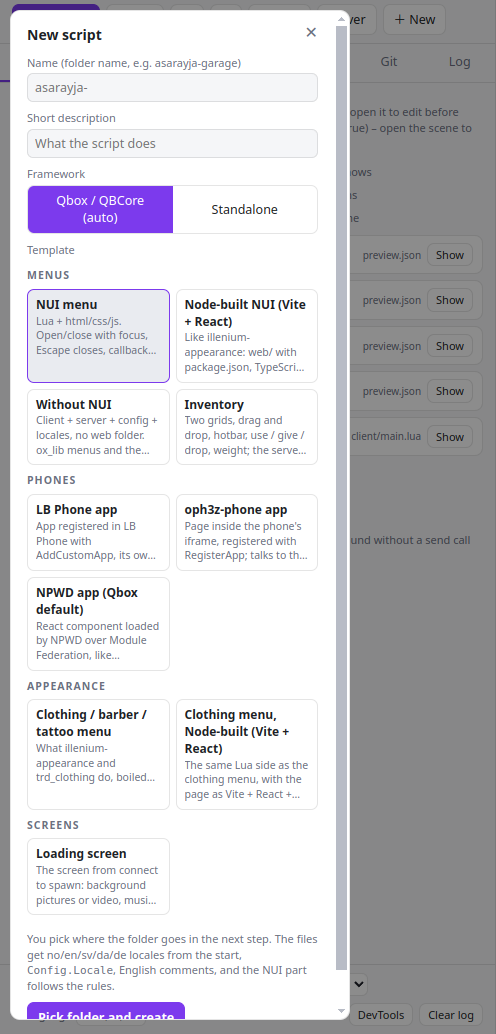
Templates
New script from a template: NUI menu, tabbed app (MDT), HUD, DUI on a surface in the world, inventory, clothing menu, loading screen, LB Phone, NPWD and oph3z phone apps. Locales in eleven languages from the start (no, en, sv, da, de, fr, nl, es, pl, uk, ro).
The HUD template is the one the tool works hardest for. A HUD is laid out against a screen, so F11 puts the menu across the whole window and the panel underneath it – and while it is being looked at here, everything is shown at once: the speedometer with no car, the tiles that would hide when full, the compass that is off by default, and an outline where the game's own minimap sits. Every element is its own: health, armour, each need, the voice, the dial, fuel, the engine, the bodywork, the seatbelt, the money and the compass all have their own place, their own switch and their own drag – the needs are icon tiles that fill rather than long bars, round or square, and the speedometer is a dial with a needle built from the top speed in the config. In the game the player opens the settings with a command (the key is offered through RegisterKeyMapping, so he can rebind it), drags the parts around while the panel is open – it is a panel he can move himself, not a screen over the HUD – and picks the colour of every element from swatches. Copy positions then gives back exactly the table shared/hud_data.lua wants. The RedM version is not the same script in a hat: no speedometer, no fuel, no seatbelt, no aircraft – those natives do not exist there – but the horse, with what it has left in it and how hurt it is, on cream paper in a serif face. An element is sized by pulling its corner, and lines appear while it moves: an edge that lines up with another element's, a middle that matches, a size that is exactly another's. What is in the gun is an element too – the clip and what is left over – and it works on both games, because those five natives are in both lists. The colours are picked in the page too: a small picker drops down on the row – a square of saturation and brightness, a hue strip, r/g/b and the hex – never the operating system's own, which opens a window over a game the player cannot click away from. And what he places is measured from the edge he placed it against, so a HUD laid out in a window still looks like that in full screen. The settings sit in three tabs so nothing has to be scrolled past, and the game's own minimap is dragged along with everything else – on FiveM, where SetMinimapComponentPosition exists; RedM has no native that moves its radar, and the box says so.
Standalone is a different offer, and the dialog says which. A standalone server has the license as identity, the ace as admin, KVP for what one player keeps and a file or oxmysql for what the server keeps – and no job, no economy and no needs, because nothing there owns them. So each template says on its card what it loses, and asks the questions that choice really has: the HUD whether to keep the money and the needs at all (left out by default – an element that says 0 for ever is worse than no element), the tabbed app whether an ace per mode or everybody may open it, and the inventory's shop hands the item over free rather than refusing a payment nobody can make.
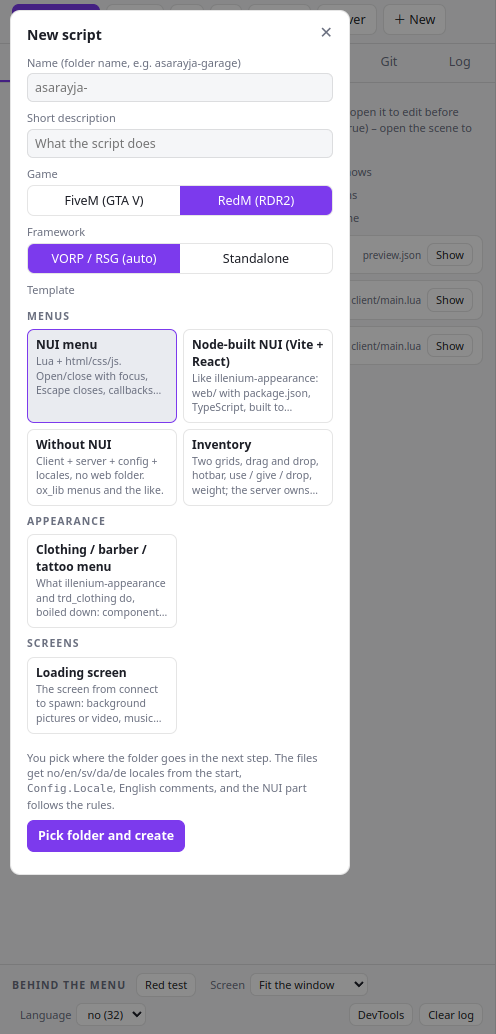
New script from a template: NUI menu, tabbed app (MDT), HUD, Node-built NUI, without NUI and loading screen, in a western look with a VORP and RSG bridge. Locales in eleven languages from the start (no, en, sv, da, de, fr, nl, es, pl, uk, ro).
Items: what they do, and how many there are
Two things about an item are easy to mix up, and they live in different places. What an item does belongs to the item: the animation, how long it takes, the hunger it restores, the health it gives back, whether it disappears when used. How many there are belongs to the shop it is sold in: the same item is finite in one shop and infinite in another, and the item itself does not know which shop it is sitting in.
In ox_inventory unlimited stock is the absence of a number: leave count out of the shop's price list and the shelf never empties; write count = 10 and the shop counts down, says sold out, and refills when the resource restarts (the stock is in memory, not in the database). An unlimited slot is never redrawn in the interface, a counted one is redrawn with a smaller number each time.
The inventory template writes both parts itself, without depending on any other resource. consume = { hunger = 30, usetime = 4000, anim = 'eating' } is the everyday case; effects = { { id = 'addHealth', amount = 30 }, { id = 'notification', text = '…' } } is everything else, as a list with a delay per effect. The half that is his screen and his ped runs on the client, the half that is his needs, his money and his items runs on the server, and neither runs the other's. Needs go through shared/framework.lua, because they are not the same number anywhere: Qbox and QBCore keep 0–100 as player metadata, rsg-core clamps the same names itself, and VORP keeps them in vorp_metabolism on a 0–1000 scale.
The tool shows what it honestly can: the progress bar for usetime, drawn with ox_lib's own page, the numbers changed on the test player, and the item gone from the inventory. What only the game can do – the animation, the prop in his hand, a screen effect – is said in the log instead of being faked.
Somebody to test with
A menu is about somebody, and outside the game there is nobody – so an inventory drew forty empty slots and an MDT was about "eksempel". The tool has one made-up character, shared by every script it opens: his name in the menu, his money in the bank, his job, his health and hunger, his items. He is kept in the tool's own settings, so he is still there next time, and nothing runs for him while no script is open. Nothing about him comes from a real server, and nothing about him is written into a script.
Ctrl+B opens the room behind him: the script's own tables first – read out of its .sql files and out of the Lua that makes them at startup, with the rows it ships – then the player. Rows can be edited, tables the tool cannot find can be added by hand, and everything can be exported as INSERT statements. The script's own .sql files are only ever read.
Ctrl+I gives him an item over the menu itself, so you watch it land in the inventory on screen. Using one follows ox_inventory's own rules: consume = 0 uses without removing, n >= 1 removes n and refuses when he carries fewer, and 0 < n < 1 wears the item down and splits a single unit off the stack.
The words a player reads
For somebody who is good at his own language and not at Lua. Ctrl+L lists every sentence in a resource and nothing else: no braces, no keys, no file to save. The locale files with the languages side by side – or one language at a time when you are writing a translation, with what another language says underneath and missing in no where a key has not been given yet – and the text written straight into the page or its script in its own group.
A change is written back into the same bytes it came from, escaped for the place it sits in, and the file is re-read first, so one that moved under the translator is refused rather than half-written. What the script fills in itself – ${n}, %s, {0}, a piece of markup – is protected: a change that would lose one is refused with the piece named.
It reads locale files (JSON and Lua, nested tables included), the page's html, its script, and its components. ps-mdt 3.1.4 has no locale files at all and keeps all 1978 of its sentences in 88 Svelte files; they are all there. Built output is skipped on purpose – a translation put there is lost on the next build – and what could not be read is named, with why. A resource that ships only its build – a release zip with web/dist and no source – is read anyway, with a line saying so, because a translation there is better than none. Any folder will do: the open script, another script in the open folder, or a folder of locale files somebody was handed to translate.
Training
Twenty-four lessons that teach it by writing it, opened with Ctrl+T. Each one builds a practice script from the same template the New button uses, takes out the one thing the lesson is about, and says what should happen. You fix it in the editor with the page on screen, and the tool marks the work with the scan, the rule check and the focus reading – not against a model answer, because there is more than one right way to write most of this. The lessons are in the language the window is in, and so is what a check answers with; the code in a lesson stays English, because it is code.
Messages and the listener, opening and closing with focus, cb on every path out, GetParentResourceName, CSS that survives the game, words from the locale files, the framework bridge, a key the player can rebind, a target that does not show twice, an item that does something, rows from a table, and the RedM manifest.
Two more courses, on the same Ctrl+T: twenty-five lessons on making clothes and ten on making tattoos. They are not checked by reading Lua, because there is none - a clothing lesson is something to do to a real garment and a tattoo lesson something to do to a real tattoo, and the check reads the files afterwards and says what it measured. Nothing is held against a model answer: what is checked is what the game actually needs. Every one of them is in all eleven languages.
A fourth course on the same Ctrl+T: sixteen lessons on making interiors. Each is something to do in the floor-plan editor - walls drawn by hand, rooms from the walls, a door and a window, what it is made of, light, a second storey, a place in the world, an interior inside one of the game's own buildings - and the check builds your plan the way writing it would and says what it found.
Send it to the server
Under ⚙ → Server add your servers: a local folder, SFTP or FTP, each with a name and a role (production or dev). Deploy (Ctrl+D) replaces the resource on the server and restarts it over RCON. Server opens the file explorer for everything else.
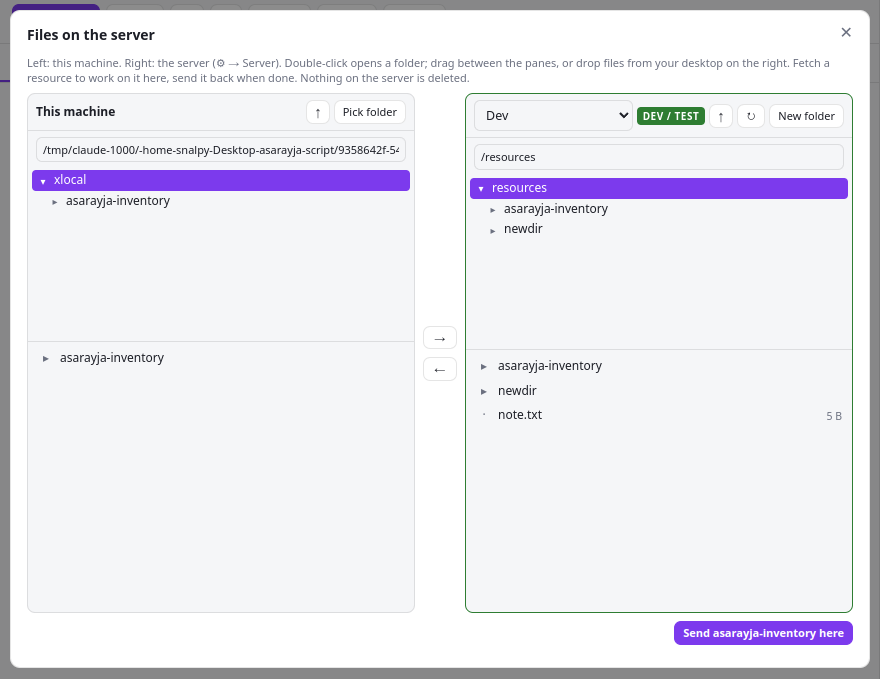
RedM: VORP and RSG
Pick RedM under the settings, with Ctrl+G or on the button in the header, and everything follows: the templates you are offered, the manifest they get, the framework the bridge talks to, and the list of scripts you opened before.
VORP and RSG Core come out as the same Framework.* calls, so a script written here runs on both. The identity is the character (charIdentifier on VORP, citizenid on RSG), money is dollars and gold either way, and the callbacks go through the bridge.
A RedM resource needs game 'rdr3' and the mandatory rdr3_warning line, or the server refuses to start it. The check says so if it is missing.
RSG servers run ox_lib, VORP servers do not. The templates stay off it and go through the bridge instead, so the same script works on both.
The RedM menu template is cream paper on ink with an engraved frame and a serif face. Rockstar's fonts are not shipped; a server that runs vorp_menu can point at its own.
The phone apps, the inventory and the clothing menu templates stay on FiveM: RedM dresses a ped with MetaPed natives and has no LB Phone or NPWD.
The inventory template can take the kilos and the capacity from vorp_inventory or rsg-inventory, so the number matches what the player sees in game. The stash stays yours.
Many VORP scripts have no page of their own and open vorp_menu instead. Those show nothing here; a script with its own NUI works like any FiveM one.
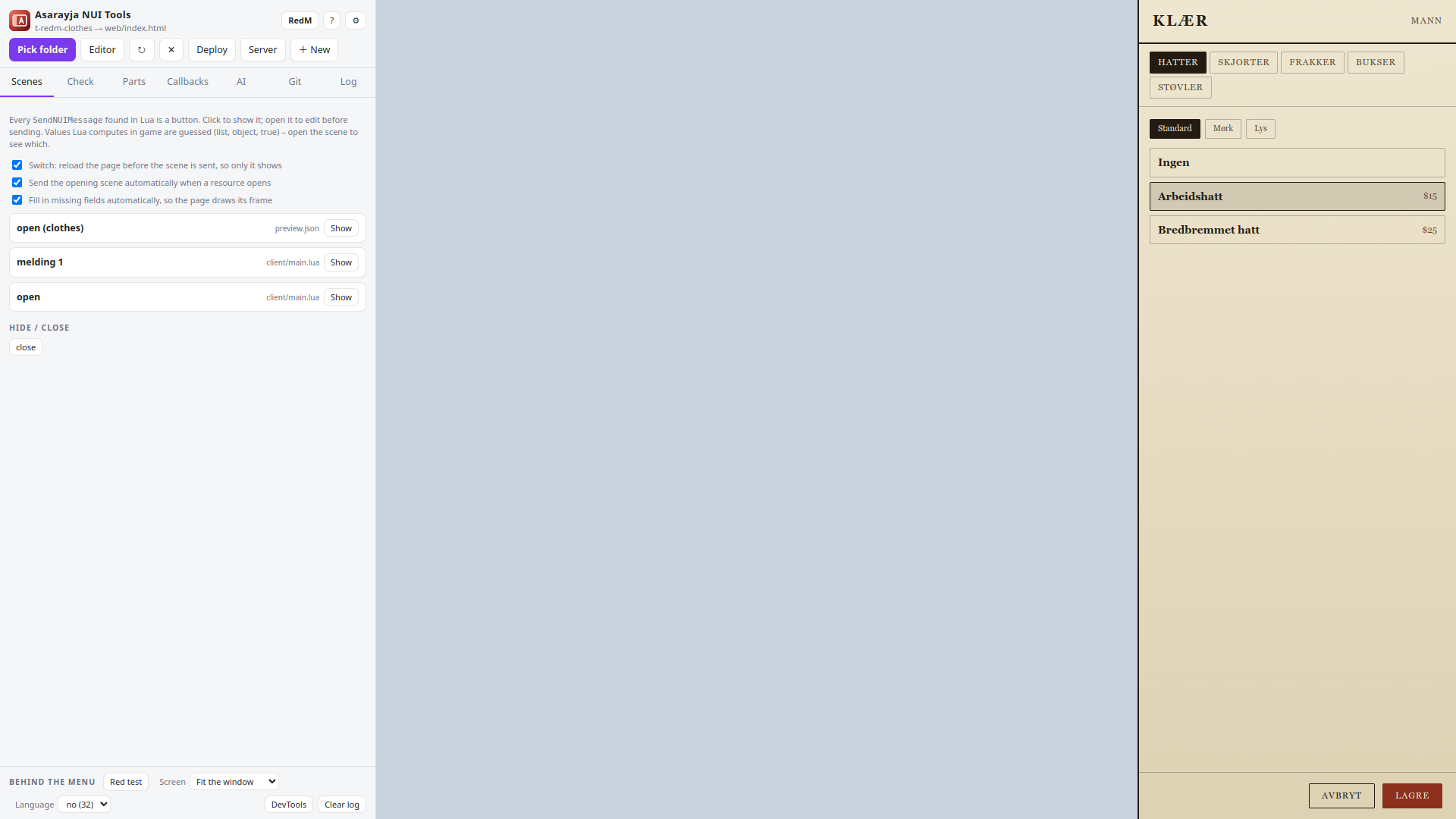
Keyboard
| Ctrl+E | Open and close the editor |
|---|---|
| Ctrl+S | Save the file in the editor |
| Ctrl+D | Deploy the open resource |
| Ctrl+G | Switch between FiveM and RedM |
| Ctrl+, | Settings |
| Ctrl+Tab | Switch between the scripts the AI touched (workspace) |
| Alt+Enter | Send the message on the AI tab |
| Ctrl+B | The database and the player this script would have |
| Ctrl+I | Give the test player an item, over the menu |
| Ctrl+L | The words a player reads |
| Ctrl+T | Training: the lessons |
| Alt+1…9 | Press a key the script offers (Alt+Shift for the next nine) |
| F11 | The menu over the whole window, the panel underneath |
| F1 | This page |
| Esc | Close a dialog |
The rules, in short
The check and the AI follow one rule set, written from what actually went wrong in real scripts. The core of it:
Lua opens and closes the menu; Escape in the page sends close to Lua; onResourceStop releases focus.
Never alert, confirm or prompt: they freeze the page in game. Build your own modal.
No backdrop-filter, no transforms on hover, no custom scrollbars, backgrounds on a child element. Test with a red body.
Every RegisterNUICallback calls cb() on every path, or the page hangs.
Prices, access and validity are checked on the server, never trusted from the page.
Every text the player sees comes from locale files; comments in English.
No icon from a CDN: the game has no internet on that page. Ship the font and the stylesheet with the resource, or draw the icon as inline svg, and never write an icon name as text a translation could touch.
Facts the owner must know print always, with the resource's name; everything else sits behind Config.Debug, off in what you ship. Never print in a loop that runs every frame.
A Discord webhook URL never leaves the server: not in a client file, not sent to the client, not printed. Keep it in a convar set in server.cfg.
The rdr3_warning line, no ox_lib, the character as the identity, item images per inventory, and some RSG pages that will not open without their token.